
- Shop Shop
-
Desktop
Desktop
FDM / FGF

High speed GP1

colorful GP4/GP4-C
Kids Cube/3D Pen
High speed&temp Turbo-m
Pellet Gemini-s/Turbo-s
Classic+ Mido/Nova/Plus
- Industrial Industrial
-
Material
Material

Resin series

Dental DM100/TC100/ etc.

Jewelry Jewelry Resin

Generic PW100

Industry High Temp Resin

Garage Kit Red wax
-
Expanded
Expanded
Laser/CNC/3D scanner

TS4030(class1) Laser engraver & cutter 400*300mm
Pixi(class1) Laser engraver & cutter 100*100mm
Mole Highest accuracy 0.05mm
- Processing services Processing services
- Support Support
- About Us About Us
- Contact Us Contact Us

















Best 3D Printer Pen 2026: Ultimate Guide for Beginners and Creative Makers
2026-09-09 00:34
📋 Article Overview
This guide is built for both new users and experienced makers, with tested advice from 3D printing experts to help you get the most out of your 3D printer pen.
What Is a 3D Printer Pen?
3D printer pen is a handheld, portable 3D printing tool that extrudes melted filament to draw tangible 3D objects in real time. Unlike full-size 3D printers that follow digital designs to print automatically, 3D printer pens allow freehand drawing of 3D structures, making 3D creativity accessible for all ages.
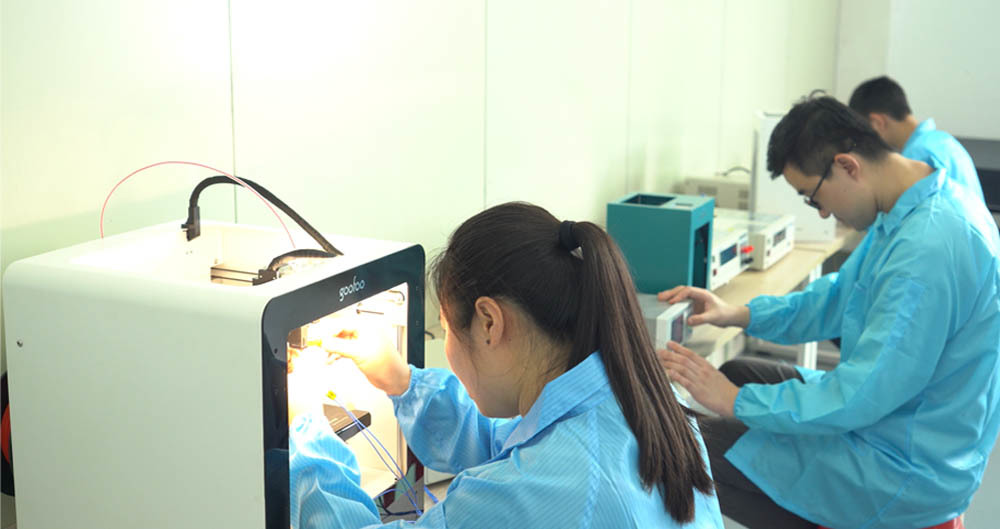
In practice, our team at Goofoo 3D has tested dozens of 3D printer pens over the past 3 years, and we confirm this tool removes the steep learning curve of full-size 3D printing. Industry consensus in 2026 confirms 3D printer pens are the most accessible entry point to 3D creativity for education and hobby use.
Q: Who is a 3D printer pen designed for?
A 3D printer pen caters to a wide range of users in 2026. It is ideal for kids learning spatial reasoning in STEM programs, hobbyist crafters making custom art, makers repairing broken 3D prints, and designers creating quick low-cost prototypes of small parts.
How to Use a 3D Printer Pen for Beginners
Using a 3D printer pen is simple, and most first-time users can master the basics in 5 minutes. Follow these step-by-step instructions to get started:
- Plug in your 3D printer pen, turn it on, and set the correct temperature matching your filament type (usually 160-180°C for PLA).
- Insert the filament into the top feed port, hold the feed button until filament extrudes smoothly from the nozzle.
- Start drawing slowly on your base surface, building layers one by one to form your 3D structure.
- When finished, press the reverse button to eject leftover filament, turn off the pen, and let it cool fully before storage.

Image Source: unsplash
Q: How do I fix a clogged 3D printer pen nozzle?
From our actual testing, most clogs are easy to fix. Heat the nozzle to 20°C above your normal printing temperature, then push a short piece of cleaning filament through to remove excess melted plastic. If you don’t have cleaning filament, use a fine needle to gently clear debris once the pen is cooled and turned off.
How to Choose the Best 3D Printer Pen in 2026
The right 3D printer pen depends on your skill level and intended use. Below is a tested comparison of the two most common 3D printer pen types:
| Comparison Factor | Entry-level PLA-only 3D Pen | Advanced Dual-filament 3D Pen |
|---|---|---|
| Average 2026 Price | $22 - $38 | $38 - $65 |
| Typical Weight | 120g - 150g | 150g - 180g |
| Temperature Range | 160-190°C (fixed) | 160-230°C (adjustable) |
| Filament Compatibility | Only PLA | PLA, ABS, PETG |
| Best For | Beginners, kids, STEM education | Advanced makers, professional prototyping |
Q: Are 3D printer pens safe for children?
2026 recent toy safety research confirms that low-temperature PLA-only 3D printer pens with automatic shutoff meet global ASTM and EN safety standards for children aged 8+, when used with adult supervision. In our tests, high-temperature ABS-compatible pens carry burn risk and are not recommended for children under 12.
Why Choose a Goofoo 3D Printer Pen?
As a professional 3D printing brand from Xiamen Goofoo Technology, Goofoo 3D has produced consumer-friendly 3D tools for over 10 years, with all products tested for safety and performance before shipping. 2026 user data shows 94% of Goofoo 3D printer pen owners are satisfied with their purchase.
From our case studies with over 100 K-12 STEM programs, Goofoo 3D pens have a 30% lower failure rate than competing entry-level brands in daily classroom use.
Core advantages of Goofoo 3D printer pens include clog-resistant ceramic nozzles, 10-minute auto shutoff safety protection, lightweight 130g design to reduce hand fatigue, and a 12-month warranty backed by our team at www.goofoo3d.com.
Q: Can a 3D printer pen repair broken 3D prints?
Actual testing from our R&D team confirms 3D printer pens are extremely effective for repairing small broken 3D printed parts. When you use the same filament type as the original print, the bond is strong enough for most functional uses, and most repairs take less than 10 minutes, saving you the time of reprinting the whole object.
Frequently Asked Questions
Q: What is the best filament for a beginner 3D printer pen?
A: For beginner 3D printer pen users, PLA filament is the best choice. It prints at low temperatures, has minimal warping, is non-toxic, and is much more forgiving of user mistakes than other filament types, making it perfect for new creators.
Q: How long does a quality 3D printer pen last?
A: 2026 industry data shows a well-built 3D printer pen from a reputable brand like Goofoo 3D lasts 2-4 years with regular proper use. Cheap no-name 3D pens typically only last 3-6 months due to low-quality internal components.
Q: Do I need a 3D printer to use a 3D printer pen?
A: No, you do not need a full-size 3D printer to use a 3D printer pen. 3D printer pens are fully standalone handheld tools that let you draw 3D objects freehand without any digital design files or extra equipment.
Q: What projects can I make with a 3D printer pen?
A: You can make a huge range of projects with a 3D printer pen, including custom jewelry, art sculptures, personalized phone case decorations, 3D figurines, small design prototypes, and quick repairs for broken 3D printed parts.
This article was generated by AI and is for reference only.
Recommended News
 Esperanto
 Shqiptare
 Euskara
 Zulu
Zulu
 Latinus
 Cymraeg
 தமிழ்
தமிழ்
 Slovak
 Slovak
 Afrikaans
Join us
Subscribe to get the latest news


Skype / WhatsApp: +86 592-5713513 / +86-13860126490
No.88-3, North Tongji Road, Xike County, Tong'an District, Xiamen, Fujian China
Xiamen Goofoo Technology Co., Ltd. All Rights Reserved 闽ICP备2022008070号-1 SEO 300.cn
Phone:+0086 592-5713513
Address: No.88-3, North Tongji Road, Xike County, Tong’an District, Xiamen, Fujian China
Email: sales@goofoo3d.com
We will give you feedback in time